PROJECTS
A collection of practical portfolio projects focused on game audio, localization QA, audio asset validation, Python automation, and technical production workflows for games.
These projects are built around real production problems: organizing large audio libraries, validating localized VO assets, improving QA documentation, reducing manual file-checking work, and testing audio implementation behavior in Wwise and Unreal Engine.
A technical audio pipeline project designed to simulate a large-scale multi-language voice-over delivery for games.
The project processes thousands of localized VO assets across English, Spanish, French and German, validates production issues, generates QA reports, stores results in SQLite, prepares a Wwise-ready import manifest, and imports valid assets into Wwise using WAAPI.
A multilingual VO pipeline for games using Excel, Python, RX, Wwise and Unreal to manage, clean, rename, import and test localized dialogue assets.
A QA-focused demo for identifying localization issues in video/game content, including subtitles, UI text, mixed languages, terminology, display bugs and language switching feedback.
Python-based workflow for scanning, validating and categorizing 400,000+ audio assets using UCS, metadata analysis and report-first pipelines.
A Python + Streamlit prototype designed to structure bug reporting, testing sessions and QA lead review workflows for video game testing.
Multi-Language VO Asset QC & Delivery Pipeline – Python, SQLite, Wwise & WAAPI

Description
This project is a production-style technical audio pipeline focused on multi-language voice-over asset quality control, localization validation, reporting, remediation, and Wwise import automation.
The pipeline simulates a large localized VO delivery with intentionally broken files to recreate the kind of issues that can appear in real game audio production: naming convention errors, missing localizations, invalid extensions, unreadable audio files, wrong sample rates, wrong channel formats, malformed filenames and files that should not be imported into middleware.
The final workflow takes the project from raw localized delivery to structured QA reports, SQLite data storage, cleaned delivery folders, Wwise import preparation and final WAAPI-based import into Wwise.
Project Goal
The goal of this project was to build a realistic technical audio workflow for localized game VO production.
I wanted to create a pipeline that could answer practical production questions such as:
• Are all localized VO files present across the expected languages?
• Are filenames following the required naming convention?
• Are the audio files technically valid?
• Which files are ready for Wwise?
• Which files require manual review?
• Which issues can be safely fixed automatically?
• Can the cleaned delivery be converted into a Wwise-ready import manifest?
• Can valid localized assets be imported into Wwise automatically through WAAPI?
The focus was not only on checking files, but on building a clear, traceable and scalable workflow that connects audio QA, localization, technical sound design and middleware implementation.
What I Built
• A simulated multi-language VO delivery across English, Spanish, French and German.
• A modular Python pipeline made of 12 scripts.
• Automated asset scanning for thousands of localized files.
• Naming convention validation for VO assets.
• Localization completeness checks across four languages.
• Audio metadata QC for sample rate, channel count, duration and unreadable files.
• SQLite database integration for structured QA data.
• SQL-based reports for production-style review.
• Final QA summary reports in CSV and Markdown.
• A remediation plan separating ready, auto-fixable, manual-fix and blocked assets.
• A cleaned fixed delivery folder containing assets approved for the next stage.
• A Wwise-ready import manifest with target object paths and suggested event names.
• WAAPI connection testing between Python and Wwise.
• Final Wwise import execution using ak.wwise.core.audio.import.
• A structured Wwise hierarchy containing localized VO sources.
Tools Used
Areas Covered
• Python
• SQLite
• CSV
• Markdown
• Wwise
• WAAPI
• PowerShell
• VS Code
• SQLite database viewer
• Technical sound design workflow
• Game audio localization QA
• VO asset validation
• Audio metadata QC
• Naming convention validation
• Missing localization detection
• Batch asset processing
• Safe automatic remediation
• Production reporting
• SQLite-based QA analysis
• Wwise import preparation
• WAAPI integration
• Middleware-ready audio structure
• Pipeline documentation
Example Pipeline Features
The pipeline detects and reports several types of production issues, including:
• Invalid VO filename structures
• Missing localized versions
• Unsupported language codes
• Invalid file extensions
• Invalid sample rates
• Invalid channel counts
• Suspiciously short audio files
• Suspiciously long audio files
• Unreadable audio files
• Filename collisions
• Assets blocked from Wwise import
• Assets ready for Wwise import
The pipeline does not silently ignore broken files. It separates them into clear categories and generates reports explaining why each asset can or cannot move forward.
Technical Breakdown
The project is structured as a step-by-step pipeline.
First, the project generates a simulated localized VO delivery with thousands of dummy audio files across four languages. Some files are intentionally broken to simulate real-world production issues.
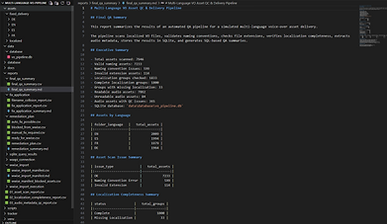
The next stages scan the delivery, validate filenames, check localization completeness and perform audio metadata QC. These results are then stored in CSV reports and imported into a SQLite database for structured querying and analysis.
After the QA stage, the pipeline generates a remediation plan. Assets are classified as ready for Wwise, safe to auto-fix, requiring manual review, or blocked from import.
The safe auto-fix stage creates a cleaned fixed_delivery folder. This keeps the original delivery untouched while creating a controlled version of the asset delivery for implementation.
The cleaned delivery is then used to create a Wwise import manifest. The manifest defines which assets are valid, which language they belong to, where they should be created in Wwise, what their Sound Voice object names should be, and which Random Container each line belongs to.
Finally, Python connects to Wwise through WAAPI and imports the valid localized assets into the Wwise project.
Pipeline Results
Final QA results:
• Total assets scanned: 7,946
• Valid naming assets: 7,233
• Naming convention issues: 599
• Invalid extension assets: 114
• Localization groups checked: 1,833
• Complete localization groups: 1,800
• Groups with missing localization: 33
• Readable audio assets: 7,862
• Unreadable audio assets: 84
• Audio assets with QC issues: 365
Wwise import preparation results:
• Ready for Wwise import: 6,950
• Blocked manifest parse errors: 242
• Unique Sound Voice objects planned: 1,894
• Unique Random Containers planned: 655
• Suggested Wwise events planned: 655
Final Wwise import execution results:
• Already imported or no change: 100
• Imported or reused: 6,850
• Total processed: 6,950



Wwise-Ready Structure
The Wwise structure was designed to keep localized VO assets organized by delivery root, character, category, line identity and variation.
The final hierarchy uses:
• Property Containers for root, character and category organization.
• Random Containers for playable VO line groups.
• Sound Voice objects for individual variations.
• Localized sources inside Sound Voice objects for each supported language.
Structure example:
VO_Localized_Delivery
→ Character
→ Category
→ Random Container
→ Sound Voice
Example:
VO_Localized_Delivery
→ FA
→ Combat
→ FA_Combat_Q_001
→ FA_Combat_Q_001_A
Each Sound Voice can contain localized sources for English, Spanish, French and German.
This structure allows future Wwise Events to target Random Containers instead of individual Sound Voice objects, keeping the implementation cleaner and more scalable.
Python Automation
Python was used as the main automation layer for the entire project.
The scripts automate:
• File generation
• Asset scanning
• Naming validation
• Localization completeness checks
• Audio metadata extraction
• Audio QC classification
• CSV report generation
• Markdown report generation
• SQLite database creation
• SQL query execution
• Remediation planning
• Safe file copying
• Wwise import manifest generation
• WAAPI connection testing
• Wwise import execution
The goal was to create a repeatable and traceable workflow rather than a one-off script.
Each step produces clear outputs, making the pipeline easier to debug, review, extend and document.


SQLite Integration
SQLite was used to store QA results in a structured database.
Instead of relying only on loose CSV files, the project imports the main reports into a local database and generates SQL-based summaries.
This makes it easier to query the delivery, review issue distribution, count assets by language, inspect audio QC problems, and structure the data in a more production-friendly way.
The database includes tables for:
• Asset scan results
• Localization completeness results
• Audio metadata QC results
• Pipeline import summaries
This adds a data-focused layer to the audio pipeline and makes the project more useful for QA review and production reporting.


Wwise / WAAPI Integration
The final stage of the project connects Python to Wwise using WAAPI.
The pipeline first tests the WAAPI connection and validates that the Wwise project is open and ready.
Then it reads the Wwise import manifest and imports valid localized assets into the Wwise project using:
ak.wwise.core.audio.import
The import creates or reuses Wwise objects and assigns the correct localized audio sources to the supported languages.
This confirms that the pipeline does not stop at validation. It reaches actual middleware implementation.
What This Demonstrates
This project demonstrates my ability to think beyond individual sound assets and design technical systems that support game audio production.
It shows experience with:
• Technical audio workflow design
• Python automation for audio production
• Game audio localization QA
• VO asset validation
• Audio metadata QC
• SQLite reporting
• Wwise project structure planning
• WAAPI-based import automation
• Production-style documentation
• Scalable problem-solving
The project connects several areas that are important in modern game audio: sound design, localization, QA, tools, data organization and middleware implementation.
It also demonstrates that I can build systems that help teams manage audio at scale, identify issues clearly and reduce repetitive manual work.
What I Learned
This project helped me understand how technical audio workflows can support real production pipelines.
I learned more about structuring a multi-step Python project, designing realistic validation rules, building readable reports, using SQLite for QA data, preparing Wwise-ready manifests and connecting Python with Wwise through WAAPI.
It also reinforced the importance of separating safe automation from manual review. Not every issue should be fixed automatically. A good pipeline should not hide problems. It should make them visible, understandable and easier to solve.
Most importantly, this project helped me connect my sound design background with technical implementation, QA thinking and production tooling.
Final Status
The project is complete as a portfolio-ready technical audio pipeline.
It successfully demonstrates a full workflow from simulated localized VO delivery to QA validation, SQLite reporting, cleaned delivery creation, Wwise import preparation and final WAAPI import into Wwise.
Possible future improvements include automatic Wwise Event creation, SoundBank generation, dashboard visualization, Excel exports and support for additional localization naming standards.
GameQA Assistant – QA Workflow Tool Prototype

Description
GameQA Assistant is a working prototype designed to support video game QA workflows through structured bug reporting, testing session tracking, QA lead review, dashboard visibility, and CSV/Excel export.
The project was built with Python and Streamlit as a practical portfolio case study focused on game QA, localization QA, audio QA, workflow automation, and production documentation.
Instead of replacing professional tools like Jira or TestRail, GameQA Assistant explores how lightweight internal tools can help testers create clearer reports and help QA leads review information more efficiently.
Project Goal
The goal of this project was to design and build a small QA workflow assistant that turns rough tester observations into structured, reviewable bug reports.
The prototype focuses on improving clarity, consistency, and handoff during the QA process by guiding testers through the information needed for a useful bug report, tracking testing sessions, storing submitted tickets locally, and exporting clean reports for documentation or review.
What I Built
• A working Streamlit prototype for video game QA workflows
• Tester Submit View for structured bug report creation
• QA Lead Review View for reviewing and updating submitted tickets
• Start / Stop Session system for tracking test passes
• Local persistence system to save tickets and session data
• Review Queue for pending QA tickets
• Dashboard summary with ticket status visibility
• CSV export for lightweight documentation
• Excel export for cleaner QA handoff and review
• Structured ticket format including category, severity, priority, reproduction steps, expected result, actual result, environment, session ID and review status
Tools Used
QA Areas Covered
• Python
• Streamlit
• Pandas
• OpenPyXL
• CSV
• Excel
• Local file persistence
• Manual QA workflow design
• Functional QA
• Game QA
• Localization QA
• Audio QA
• UI/UX issue reporting
• Bug report structuring
• QA lead review workflow
• Test session tracking
• Review queue management
• QA documentation and export
Technical Breakdown
The prototype is structured around two main workflows: tester submission and QA lead review.
In the Tester Submit View, the user can start a testing session, submit structured bug reports, and save each ticket locally. The form captures key QA information such as title, description, category, severity, priority, reproduction steps, expected result, actual result, platform/environment, and additional notes.
In the QA Lead Review View, submitted tickets can be reviewed, updated, assigned a review status, and prepared for export. A Review Queue helps separate pending tickets from reviewed ones, making the workflow easier to follow.
The dashboard provides a simple overview of submitted tickets and their current status, while the export system allows the data to be converted into CSV and Excel reports for documentation or handoff.


Python Automation

Python was used to automate the structure, storage, review, and export of QA ticket data.
The prototype uses Pandas to manage ticket information as structured data, while OpenPyXL supports Excel export for clean reporting. Streamlit provides the interactive interface, allowing the tool to behave like a lightweight internal QA application rather than a static spreadsheet.
The automation focuses on reducing repetitive manual work, keeping ticket data consistent, and making QA information easier to review, filter, export, and document.
What This Demonstrates
This project demonstrates my ability to design practical tools around real game production workflows.
It shows experience with QA logic, structured bug reporting, session-based testing, data organization, Python automation, Streamlit prototyping, CSV/Excel workflows, and production documentation.
It also demonstrates my understanding of how QA information moves between testers, QA leads, developers, localization teams, and audio teams — and how better structure can improve communication during development.
What I Learned
This project helped me think beyond simply finding bugs and focus more on how QA information is captured, reviewed, organized, and handed off.
I learned how important structure is in a QA workflow. A bug report is only useful if it gives the team enough information to understand, reproduce, prioritize, and resolve the issue.
I also gained more practical experience building a small internal tool with Python, Streamlit, Pandas, CSV and Excel exports. The project improved my understanding of session tracking, local persistence, review queues, dashboard design, and how automation can support production workflows without overcomplicating the process.
EN/ES Video Localization QA Pipeline – Unreal, Wwise & Python

Description
A small QA-focused localization demo designed to show how I review EN/ES subtitles, audio implementation, UI text, terminology issues, and bug reporting workflows for games and interactive media. The project combines manual QA, localization review, structured bug documentation, Python validation scripts, and Unreal/Wwise implementation.
Project Goal
The goal of this project was to build a compact but realistic localization QA workflow for a bilingual EN/ES game-style demo. I wanted to test and document issues related to subtitles, UI text, audio-language consistency, terminology, reading speed, text overflow, and implementation feedback.
What I Built
-
A short video demo with intentional localization and UI issues.
-
EN/ES subtitle and audio test cases.
-
A structured QA report in CSV format.
-
Python scripts to validate subtitle structure, check reading speed, and generate a QA summary.
-
A GitHub repository with the project structure, scripts, sample data, and documentation.
-
A clear bug log with timecodes, categories, severity, current result, expected result, and notes.
Tools Used
QA Areas Covered
-
Unreal Engine 5
-
Audiokinetic Wwise
-
Python
-
CSV / Excel
-
Reaper / audio editing tools
-
GitHub
-
Manual QA review
-
Localization QA review
-
Subtitle timing and reading speed
-
Text overflow
-
UI spelling mistakes
-
Mixed-language issues
-
Terminology consistency
-
Audio/subtitle mismatch
-
Language switching feedback
-
Naming consistency
-
Visual consistency
-
Bug reporting and documentation
Example Bugs
UI Spelling Issue
Timecode: 00:10–00:12
Current: “Language Swiching”
Expected: “Language Switching”
Category: UI Text / Spelling
Severity: Medium
Text Overflow
Timecode: 00:37–00:40
Issue: Spanish subtitle exceeds the visible screen area.
Expected: Subtitle should remain fully visible and readable.
Category: Display / Subtitle QA
Severity: High


Python Automation
To support the QA workflow, I created small Python scripts to validate subtitle structure, check subtitle reading speed, and generate a summary from the QA report. The goal was not to replace manual QA, but to reduce repetitive checks and make the review process more consistent.
What This Demonstrates
This project demonstrates my ability to combine manual QA, localization review, technical audio knowledge, structured documentation, and basic Python automation. It also shows how I approach quality from both a player-facing and production-facing perspective: identifying issues, documenting them clearly, suggesting expected results, and organizing information in a way that developers or localization teams can act on.
EN/ES Video Localization QA Pipeline Demo – Unreal, Wwise & Python

Description
A technical audio pipeline demo focused on bilingual EN/ES voice-over organization, editing, implementation, and testing for games. The project was designed to show how I manage localized dialogue assets from spreadsheet tracking to Wwise integration and Unreal Engine playback.
It combines VO asset management, structured naming conventions, Python automation, Wwise localization workflows, and in-engine testing to demonstrate a practical production-style pipeline for game audio and localization.
Project Goal
The goal of this project was to build a practical VO localization pipeline for a game-style environment. I wanted to create a workflow that could organize, rename, prepare, implement, and test bilingual English and Spanish dialogue assets in a clear and scalable way.
The focus was on reducing manual errors, keeping asset naming consistent, supporting Wwise localization, and validating that the correct language and audio events play inside Unreal Engine.
What I Built
-
A bilingual EN/ES voice-over pipeline for game dialogue.
-
More than 200 edited VO audio assets organized by language, character, category, line type, ID, and variation.
-
An Excel-based dialogue database used as the source of truth for asset names and structure.
-
Python scripts to generate filenames, copy/rename audio files, and prepare Wwise-ready folders.
-
A Wwise project using localized audio sources for English and Spanish.
-
Unreal Engine test interactions to trigger dialogue events and test language switching.
-
A structured workflow from raw audio to cleaned files, final assets, Wwise import, and in-engine playback.
Tools Used
-
Unreal Engine 5
-
Audiokinetic Wwise
-
Python
-
Microsoft Excel
-
Reaper
-
iZotope RX
-
GitHub
-
Manual QA review
-
Audio implementation testing
Pipeline Areas Covered
-
VO recording and editing
-
Dialogue asset organization
-
EN/ES localization structure
-
Spreadsheet-based asset tracking
-
File naming consistency
-
Python automation
-
Wwise localized source import
-
Unreal Engine audio playback
-
Language switching tests
-
Missing file and naming issue checks
-
Audio implementation validation
-
QA-style pipeline documentation
Workflow Overview
The pipeline starts with raw dialogue recordings organized by language and character. After editing and cleaning the audio, the final files are renamed using an Excel database and Python scripts. The assets are then prepared for Wwise localization import, where English and Spanish versions are connected to the same dialogue events.
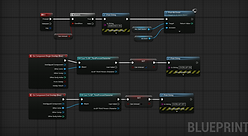
Inside Unreal Engine, I created simple interactions to trigger the dialogue and test whether the correct localized audio plays depending on the selected language.



Technical Breakdown
Excel Dialogue Database
The Excel database was used to organize each dialogue line with information such as language, character, category, line type, ID number, variation, and final filename. This helped keep the project structured and reduced the risk of inconsistent naming.
Python Automation
I created Python scripts to automate repetitive parts of the pipeline, including filename generation, file copying, renaming, and Wwise-ready folder preparation. The goal was to reduce manual mistakes and make the workflow faster, cleaner, and easier to scale.
Wwise Localization
In Wwise, I used localized audio sources so that English and Spanish assets could share the same event structure. This allowed one event to trigger the correct audio depending on the selected language, instead of duplicating separate events for each language.
Unreal Engine Testing
In Unreal Engine, I created a simple test scene with interactable dialogue buttons. This allowed me to test VO playback, language switching, event triggering, and basic implementation behavior inside the engine.
Example Pipeline Features
VO Naming Convention
Example:
VO_EN_FA_Work_Q_003_A.wav
This naming structure helped identify each asset clearly:
-
Language: EN / ES
-
Character: FA / MA / SYS
-
Category: Greeting, Complaint, Work, Idle, Reaction, Objective, System
-
Line Type: Question / Response
-
ID Number
-
Variation
Python Automation Example
The Python scripts helped convert spreadsheet data into production-ready filenames and folder structures. This made the process more reliable than manually renaming files one by one.
Wwise-Ready Structure
The final assets were prepared into language-specific folders for Wwise localization import, keeping English and Spanish assets organized and ready for implementation.
What This Demonstrates
This project demonstrates my ability to design and manage a practical game audio localization pipeline from start to finish. It shows how I combine technical audio, localization structure, Python automation, spreadsheet organization, Wwise implementation, and Unreal Engine testing.
It also reflects how I approach production workflows: keeping assets organized, reducing manual errors, documenting clearly, and validating the final result inside the engine.
What I Learned
This project helped me understand how important structure is when working with localized game audio. Managing more than 200 VO assets made it clear that naming conventions, spreadsheet tracking, automation, and implementation testing are essential to avoid mistakes.
It also strengthened my experience with Wwise localization workflows, Unreal Engine testing, Python scripting, and practical QA thinking applied to audio implementation.
Audio Asset Analysis & QA Pipeline

Description
A Python-based technical audio workflow designed to scan, validate, analyze and categorize very large sound libraries safely before any file operation is performed.
This project was built around a real production problem: managing hundreds of thousands of audio assets collected from multiple commercial libraries over several years, with inconsistent naming conventions, duplicate content, corrupted audio, mixed sample rates and poorly organized structures.
Project Goal
Build a safe and scalable Python-based workflow to analyze, validate and organize extremely large audio libraries before performing any file operations.
The project started as a real-world technical audio problem:
managing hundreds of thousands of sound assets collected across multiple commercial libraries with inconsistent naming conventions, duplicate content, mixed formats, corrupted files and poor categorization.
The goal was not to automatically “fix” the library, but to create a reliable report-first pipeline capable of understanding the data before making organizational decisions.
What I Built
I built a multi-stage audio asset analysis pipeline using Python, CSV/Excel workflows and UCS-based categorization logic.
The system scans large audio libraries, extracts metadata, validates technical consistency, detects potential issues, suggests categories, and generates structured reports for manual review.
The workflow was tested on a real archive containing more than:
-
524,000+ total files
-
412,000+ valid audio assets
-
4TB+ of data
The project focuses heavily on technical reliability, scalability and safe workflows for audio production environments.
Tools Used
Pipeline Areas Covered
-
Python
-
pandas
-
soundfile
-
mutagen
-
openpyxl
-
CSV / Excel workflows
-
UCS v8.2.1
-
PowerShell
-
Windows file system workflows
-
Library scanning
-
Audio metadata extraction
-
Technical audio validation
-
Duplicate candidate detection
-
Naming issue detection
-
UCS-based category suggestions
-
Validation and suspicious pattern analysis
-
Corrupt/placeholder audio detection
-
Compound tokenization and CamelCase parsing
-
Large-scale CSV reporting workflows
Workflow Overview
01 — Scan the library structure
02 — Extract audio metadata
03 — Generate library summary reports
04 — Detect duplicate candidates
05 — Detect naming issues
06 — Flag audio QA/review problems
07 — Suggest UCS-based categories
08 — Validate suspicious classifications and edge cases
The workflow remains fully report-first and non-destructive.


Technical Breakdown
The project combines metadata analysis, keyword classification, tokenization logic and validation systems to process very large audio collections efficiently.
A major focus of the workflow is reliability across completely different libraries rather than achieving perfect results in only one folder structure.
Custom tokenization logic was developed to improve recognition of compound and CamelCase file names such as:
-
GunshotPistol
-
LaserGunshotCartoon
-
SnareDrumHit
-
HandCymbalsHit
The pipeline also separates:
-
classified assets
-
review-required assets
-
corrupted audio
-
unsupported formats
-
unresolved/no-match files
Example Pipeline Features
-
Detecting corrupted WAV files with invalid headers
-
Identifying preview/demo/non-asset audio
-
Detecting unusual sample rates and channel layouts
-
Flagging suspicious category matches
-
Separating asset family from secondary descriptors
-
Handling macOS resource fork metadata files
-
Supporting mixed commercial sound libraries at scale
-
Generating validation reports for QA review
Python Automation Example
The workflow uses Python scripts to automate repetitive large-scale analysis tasks such as:
-
Reading and validating hundreds of thousands of audio files
-
Extracting technical metadata automatically
-
Building searchable CSV reports
-
Detecting naming inconsistencies
-
Suggesting UCS-based categories from filenames and folder structures
-
Generating validation summaries and suspicious pattern reports
The system processed more than 412,000 audio files in a single full-library test run.
What This Demonstrates
This project demonstrates my ability to design practical technical audio workflows that solve real production problems, not just isolated scripting exercises. It combines Python automation, large-scale data handling, audio metadata analysis, QA validation, UCS-based categorization and structured reporting into one scalable pipeline.
It also shows how I approach audio asset management from both a sound design and technical perspective: safely, methodically and with a strong focus on reviewable results before making any destructive changes.
What I Learned
This project taught me far more than basic scripting.
It forced me to think about scalability, validation, edge cases, reliability and workflow safety in a real production-style environment.
I learned how quickly audio libraries become difficult to manage without structured systems, and how important reporting, validation and review workflows are before performing destructive operations.
It also helped me improve my understanding of:
-
Python data workflows
-
technical audio metadata
-
large-scale CSV processing
-
QA logic
-
categorization systems
-
tokenization strategies
-
scalable pipeline architecture
Future planned step: moving from CSV-only workflows into SQLite-based asset tracking and querying systems.